When plans change, your policy does the work.
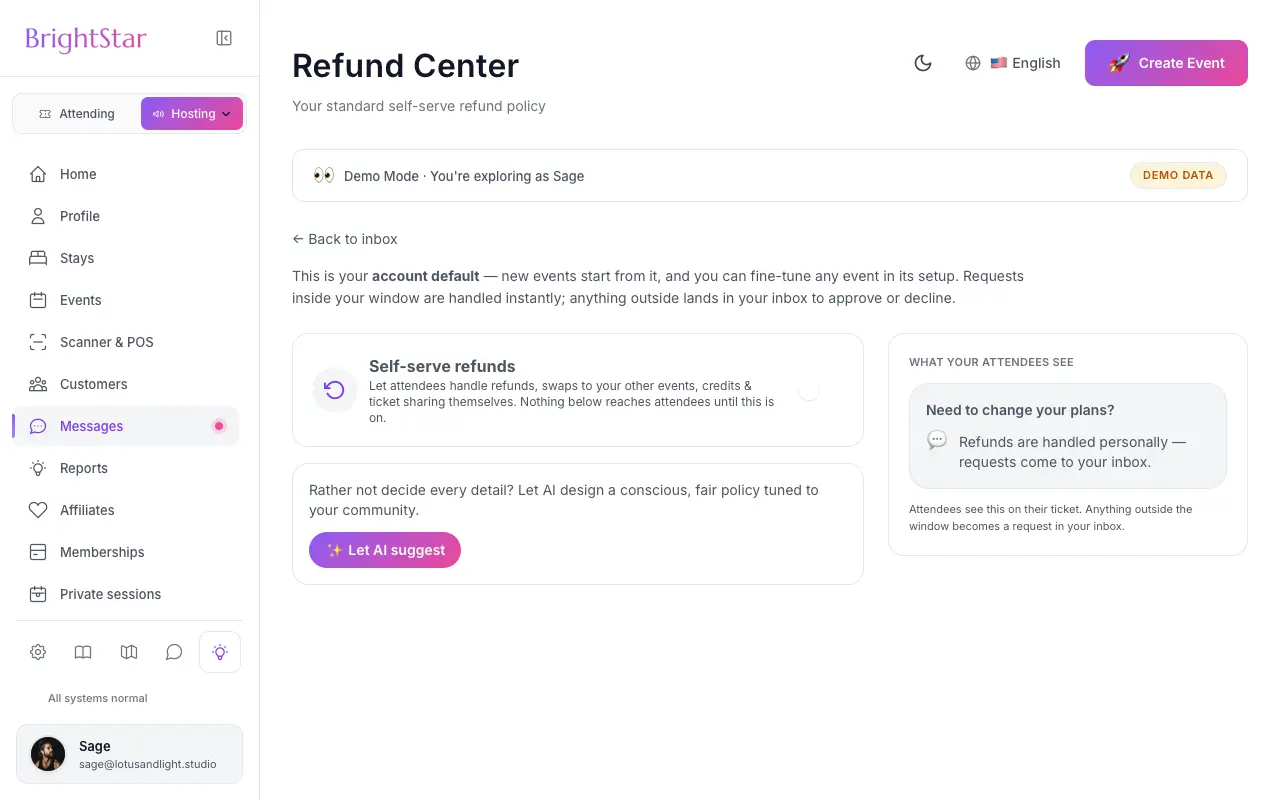
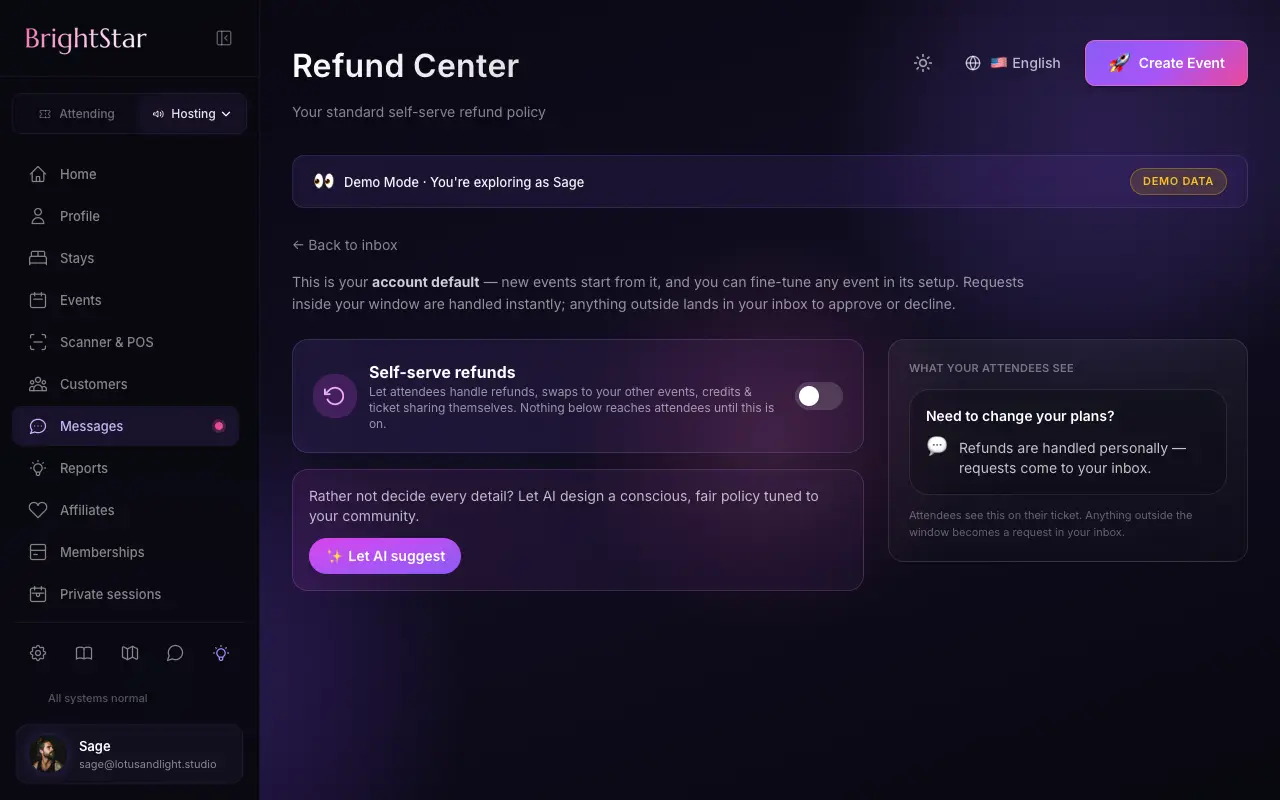
Buyers request a refund themselves; inside your policy it is processed at once, outside it the request comes to you.
Cadastre-seIncluded on Elevate and Amplify.
Fewer emails, fair outcomes
Your policy, enforced
Set the window, days or hours before the start, per event or as an account default.
Instant inside the window
A request within your policy is refunded at once, with no email back and forth.
You decide the rest
Requests outside the policy open a conversation in your inbox with the buyer’s reason.
How it works
Set your policy
Choose the refund window and your policy text.
Buyers request
From their order page, with a reason.
It resolves
Inside the window it is refunded; outside it, you decide from your inbox.
Loved by artists and organizers
“Há quase duas décadas, Akal (dono da BrightStar) coloca seus talentos a serviço do movimento Bhakti. A plataforma dele serve ao nosso movimento com autenticidade e coração únicos. E a tecnologia também é ótima!”

Jai UttalIndicado ao Grammy (cliente desde 2014)
“A BrightStar não oferece apenas uma plataforma poderosa, que funcionou muito bem nos meus eventos: o suporte é o melhor que existe. A comunicação é pessoal, vem do coração e é sempre atenciosa.”

Peter KaterDuas vezes vencedor do Grammy (cliente desde 2014)
“Ficamos muito felizes com o atendimento excepcional que recebemos ao trabalhar com a BrightStar, e é muito bom apoiar uma empresa autenticamente comprometida com os ideais da consciência elevada.”

Eric ForbisFundador, BuddhaFest (cliente desde 2012)
Questions organizers ask
Can I control the refund deadline?
Yes. Set it per event or as a default for your account; tiered windows are supported.
What if I do not offer self-serve refunds?
Then buyers do not see the refund option. They can still message you.
Can I refund from the dashboard?
Yes. Refund any order in full or in part, or cancel and refund a whole event or one ticket type.
Does a refund cancel the ticket?
A refund returns money; voiding is a separate step that cancels the ticket.
Leia mais
Why a clear refund policy helps everyone
Refund requests are rarely about money alone. A guest falls ill, a flight is cancelled, a family matter comes up. What they need is a clear answer, quickly. What you need is not to spend the week before your event in an inbox negotiating each case. Flexible refunds lets you decide your policy once, in calm conditions, and then lets that policy do the routine work. Requests that fall inside it are settled without you. The ones that need judgment come to you with the buyer’s reason attached.
Setting your policy
A refund policy can be set for a single event or as a default for your whole account, which new events then follow unless you change it for one of them. The policy says whether buyers may request a refund themselves, how much of the ticket price is returned, and until how long before the start. A policy can also step down in stages, so that someone who cancels well ahead receives more than someone who cancels in the last days. Your written policy text is shown to buyers, so the rule they agreed to is the rule that is applied.
How a buyer requests a refund
The buyer opens their order page, chooses the tickets they want to cancel and gives a reason. They can see what the policy returns before they confirm. There is no form to email and no need to find your contact details. If you have not opened self-serve refunds for an event, the buyer does not see a refund option at all; they see a way to message you instead, and you handle the matter personally.
Inside the policy: settled at once
When a request falls within your policy, the refund is processed at that moment and goes back to the payment method the buyer used. The buyer does not wait for you, and you do not have to approve something you already decided in advance. Refunds are issued through Stripe, which processes every paid ticket on BrightStar, and how quickly the money shows on the buyer’s statement depends on their bank or payment provider.
Outside the policy: a conversation
A request that falls outside the policy, for example after the deadline, is not refused by a machine. It opens a refund conversation in your inbox, tied to the order, with the buyer’s reason in their own words. You can approve it, decline it, or reply first. The assistant that can draft replies in your inbox never decides a refund; it can only acknowledge the request. Decisions about money stay with a person.
Refunds you make yourself
From the dashboard you can refund any order in full or in part at any time, whatever your self-serve policy says. If an event cannot go ahead, or one ticket type has to be withdrawn, you can cancel and refund the whole event or that one ticket type in a single action, and the orders are worked through one by one. This is the route for the situations a policy cannot foresee.
A refund and a void are two things
Returning money and cancelling a ticket are separate steps on BrightStar, on purpose. A refund sends money back; by itself it does not make a ticket invalid. Voiding is the step that cancels the ticket so that it no longer scans at the door and its place returns to sale. Keeping them apart lets you, for instance, return part of the price as a goodwill gesture while the guest still attends. When a buyer cancels tickets through the self-serve policy, those tickets are marked as refunded as part of the request.
Where it is included
Self-serve refunds within a policy are part of Elevate and Amplify. Refunds, like transfers, appear in your reports, so your net figures stay honest after the event.
Choosing a policy that fits your gathering
There is no single right policy. A concert with a waiting public can afford a generous window, because a returned seat is easily sold again. A small retreat with rooms reserved months ahead usually needs an earlier cut-off, since a late cancellation leaves a bed that cannot be filled. A weekly class may simply ask for a day’s notice. Think about the moment after which a cancellation costs you money, and set the deadline there.
Saying it clearly to buyers
A policy only prevents disputes if people have read it. Put the essentials in plain words in your policy text: until when a refund is possible, how much comes back, and what happens after that. Avoid legal phrasing where a sentence will do. Buyers who know the rule before they book rarely argue with it later, and those who ask for an exception do so knowing it is one.
When you cancel or change an event
Sometimes the change comes from your side: a teacher is ill, a venue falls through. In that case you do not wait for requests. You refund the affected orders from your dashboard, or cancel and refund the whole event or one ticket type in one action. Writing to your guests first, with Message Attendees, lets them hear the news from you before the refund notice arrives.
Ticket Categories
Group your ticket types into clear categories, so buyers see the shape of your event and find their ticket fast.
Ver o recurso →Assigned Seating
Buyers pick their exact seat from a clear, live map, and the seat is theirs the moment they pay.
Ver o recurso →Custom Questions
Add your own questions to checkout and every answer arrives tied to the right attendee, ready to export.
Ver o recurso →Códigos de desconto
Códigos que abrem e fecham no relógio do seu evento, cobrem só os ingressos que você escolhe e mostram o que cada um vendeu.
Ver o recurso →Smart Pricing
Get a suggested price for every ticket type, based on similar events near you, and decide for yourself.
Ver o recurso →Ticket Sharing
Buyers share tickets with the people coming along, and each person gets their own QR code for the door.
Ver o recurso →See allThere is more to see.