Collaborate on one event, not your whole account.
Invite a partner by email and the event appears in their own dashboard, with only the access you give them.
Cadastre-seIncluded on every plan, Seva included.
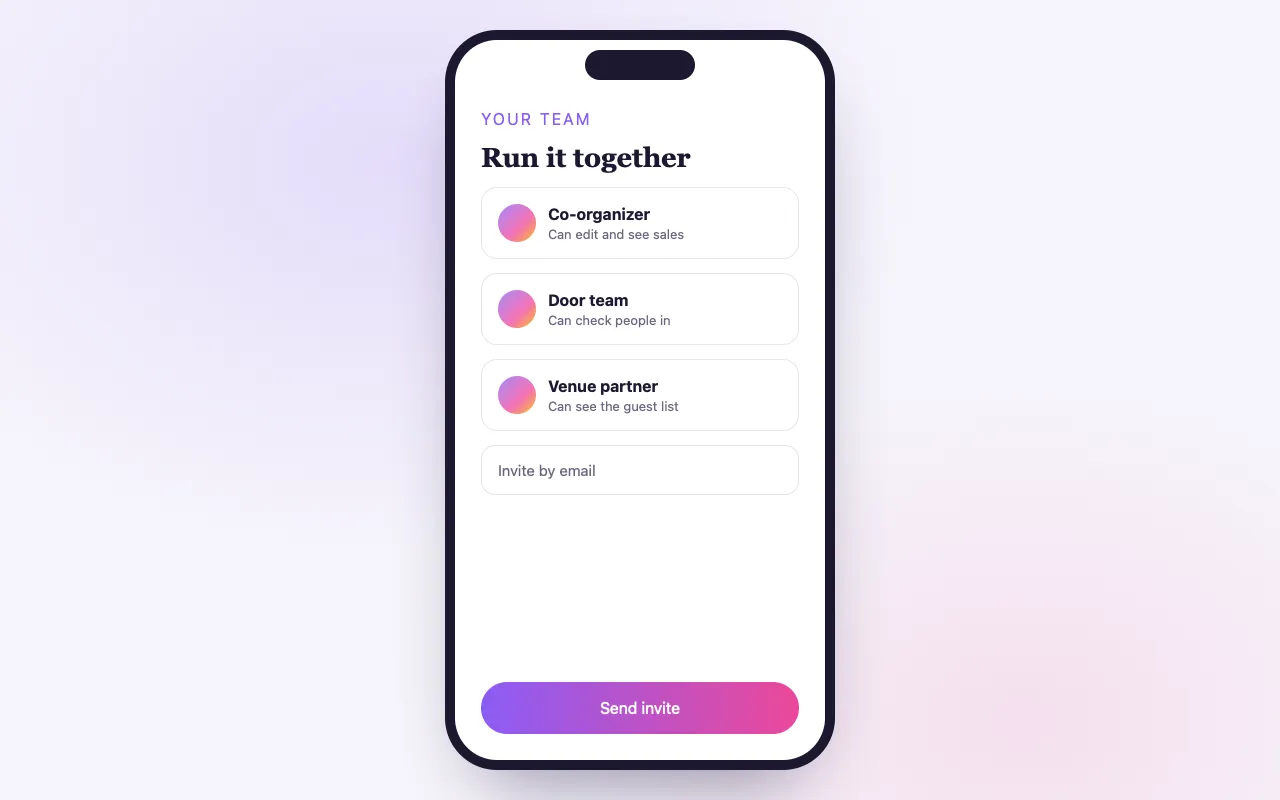
Partnership without exposure
Their own login
No shared passwords. Each collaborator uses their own BrightStar account.
Only what you share
Choose a role or exact permissions, such as check-in and the guest list, for that one event.
Revoke in one click
Remove someone and the event leaves their dashboard. Your payouts never move.
How it works
Invite by email
Add your partner on the event’s settings.
They manage their piece
Check-in, guest list or sales, whatever their role allows.
You keep control
Payouts, your customer list and your other events stay private.
Loved by artists and organizers
“A BrightStar apoia meus shows desde o começo da minha carreira e teve papel decisivo no crescimento do meu público. A lealdade e a dedicação deles, tanto a artistas quanto a organizadores, são exemplares — assim como o profissionalismo.”

Snatam KaurIndicada ao Grammy (cliente desde 2005)
“A BrightStar é uma amiga próxima e aliada da The Shift Network, e tem sido fundamental para dar visibilidade aos nossos programas. Compartilhamos valores espirituais voltados a elevar a humanidade. A BrightStar une experiência profissional em marketing a um serviço que vem do coração.”

Philip HellmichDiretor de Paz, The Shift Network (cliente desde 2012)
“Há quase duas décadas, Akal (dono da BrightStar) coloca seus talentos a serviço do movimento Bhakti. A plataforma dele serve ao nosso movimento com autenticidade e coração únicos. E a tecnologia também é ótima!”

Jai UttalIndicado ao Grammy (cliente desde 2014)
Questions organizers ask
Can collaborators see my financial data?
Only for the event you share, and only if their role includes it. Your payout settings and other events stay private.
How is this different from adding a team member?
A team member gets access across your account. Event Sharing gives one person access to one event.
Can I revoke access?
Yes, instantly. The event simply disappears from their dashboard.
Which plans include it?
Every plan, including Seva.
Leia mais
Sharing one event without sharing everything
Gatherings are rarely the work of one person. A teacher co-hosts with a studio. A promoter works with a venue. A festival has a volunteer coordinator, a box office lead and a bookkeeper. Each of these people needs to see or do something on one event, and none of them needs your whole account. Event Sharing gives a person access to a single event, with exactly the permissions you choose, from their own BrightStar login.
How you invite someone
On the event, you add a collaborator by email and choose their role. They receive an invitation. Once they have a BrightStar account under that email, the event appears in their own dashboard. No password is passed around, and nothing is installed.
The roles
Roles are named for what people do. Viewer can look at the event and nothing more. Box Office can view, scan tickets and take door sales. Marketing can view the event and its reports. Finance can view, see reports, customer details and the money. Manager can do all of these and edit the event. If none fits, a custom role lets you tick the individual permissions.
The seven permissions
Behind the roles are seven permissions: view the event; edit it; scan tickets; take door sales; see reports; see customer details; see financial figures. Customer details and financial figures are deliberately separate from the rest. A person who checks tickets has no reason to see your revenue, and a person who reads your sales report has no reason to see your guests’ email addresses unless you decide so.
What a collaborator can never do
Some things stay with the owner whatever role you give. Collaborators do not create or delete events in your account. They do not see or change your payout setup or your Stripe connection. They do not see your other events. Money from ticket sales continues to go to your Stripe account and nowhere else.
What they see
A collaborator sees the shared event in their own dashboard, alongside any events of their own, and can switch between accounts they have access to. What appears inside follows their role: a Box Office collaborator sees the guest list and the scanner, and where a role does not include money, the figures are not shown.
At the door
For the day itself, sharing is how you staff the door. Give each helper the Box Office role on that event. They sign in to the BrightStar Organizer app with their own account, see the event and scan. Because each person has their own login, check-ins are attributable, and one lost phone does not compromise your account.
Removing access
You can remove a collaborator at any time. The event disappears from their dashboard at once. There is nothing to change on your side afterwards, no password to reset and no devices to sign out, because they never had your credentials.
Sharing one event or your whole account
Event Sharing is for people who work with you on one gathering. For people who work with you on everything, such as a business partner or an assistant, team access gives a role across your account and all its events. The same role names are used in both places and mean the same thing.
Typical arrangements
A visiting teacher and a host studio: the studio owns the event, and the teacher has the Marketing role to watch sales. A promoter and a venue: the promoter owns the event, and the venue’s front-of-house staff have Box Office. A retreat with a separate registrar: the registrar has a custom role with view, customer details and reports, without money. A festival’s accountant: Finance.
Good practice
Give the least access that lets someone do their work, and prefer roles to custom combinations so that it is obvious later what each person can do. Review the list of collaborators after each event and remove those who were only needed for the day. Add people by the email address they actually use to sign in.
Co-hosting and money
Sharing gives access; it does not divide revenue. Ticket money is paid into the owning organizer’s Stripe account. If you split proceeds with a co-host, the Finance role lets them see the figures, and the settlement between you is made outside BrightStar.
Where it is included
Event Sharing is part of every plan, including Seva. There is no charge per collaborator.
Why not simply share a login
It is tempting to give a co-host your password for the week. Resist it. A shared login gives the other person everything: every event, every customer, your payout settings. You cannot tell afterwards who changed what, and you cannot take access back without changing the password for everyone. A collaborator invited to one event can do their work from the first minute, sees only that event, and is removed with one click when the work is done.
A worked example
A sound healer is invited to hold an evening at a yoga studio. The studio creates the event and is its owner, so ticket money goes to the studio’s Stripe account. The studio invites the healer with the Marketing role, so she can watch sales and share accurate numbers with her list, and invites its two front-desk staff with Box Office for the night. After the evening the studio removes the front-desk grants and leaves the healer’s in place until the settlement between them is done.
Meta Retargeting
Set a daily budget and BrightStar runs ads built from your event to the people most likely to come.
Ver o recurso →Verified Buyer Network
Your event is promoted to nearby people who buy tickets to events like yours, not a purchased list.
Ver o recurso →Outbound Email Marketing
BrightStar writes and sends email campaigns about your event to your past buyers and nearby people who go to events like yours.
Ver o recurso →SMS & WhatsApp
Buyers who opt in get your event reminders by text or WhatsApp, on the same schedule as the emails.
Ver o recurso →Event Upsell Network
When someone buys a ticket to a similar event, yours can appear right after, on the pages and emails they are already reading.
Ver o recurso →Direct Mail Campaigns
A printed postcard or letter composed from your event, with a QR code that opens your event page.
Ver o recurso →See allThere is more to see.