One-to-one, booked from your profile.
Clients book free sessions from your profile today; paid sessions are opening soon.
S'inscrireIncluded on Elevate and Amplify.
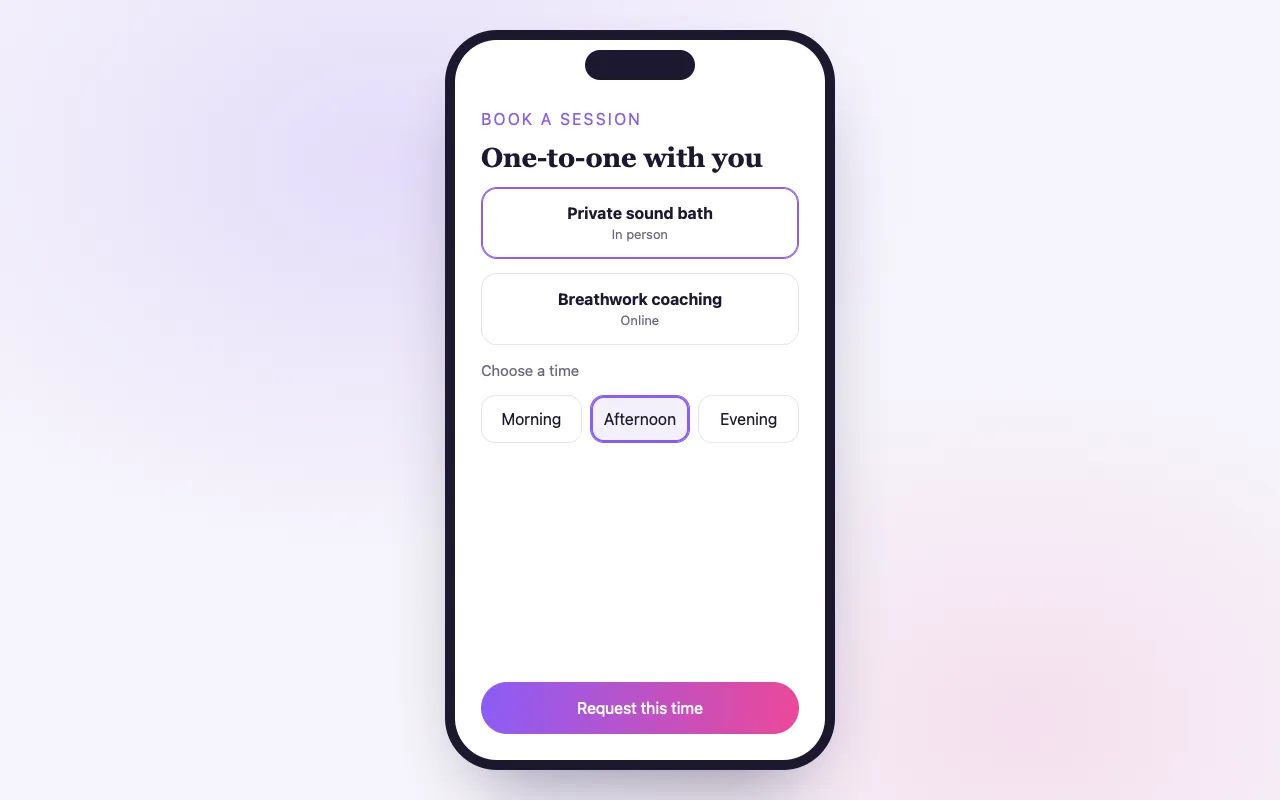
Your time, booked without the back-and-forth
Session types
Set the length, place (in person, online link, phone), buffers, notice and a daily limit for each.
Your availability
Weekly hours with date overrides, set once in your dashboard.
Never double-booked
Once someone books a time, it is locked across your sessions and your own events.
How it works
Create a session type
Name it, set the length and where it happens.
Set your hours
Weekly availability, with days off as overrides.
Clients book
From your profile or a private link; both of you get a calendar invite and a reschedule or cancel link.
Loved by artists and organizers
“BrightStar est un ami proche et un allié de The Shift Network, et son aide a été inestimable pour faire connaître nos programmes. Nous partageons des valeurs spirituelles tournées vers l’élévation de l’humanité. BrightStar allie une vraie expertise marketing à un service qui vient du cœur.”

Philip HellmichDirector of Peace, The Shift Network (client depuis 2012)
“Depuis près de vingt ans, Akal (le fondateur de BrightStar) met ses talents au service du mouvement Bhakti. Sa plateforme sert notre mouvement avec une authenticité et un cœur uniques. Et la technologie assure aussi !”

Jai UttalNommé aux Grammy Awards (client depuis 2014)
“BrightStar ne propose pas seulement une plateforme puissante qui a très bien fonctionné pour mes événements : leur accompagnement client est le meilleur. Leur communication est personnelle, sincère et toujours attentionnée.”

Peter KaterDeux fois lauréat d’un Grammy (client depuis 2014)
Questions organizers ask
Can clients book a session with me today?
Yes, free sessions: clients book them from your profile or a private link today. Paid sessions are opening soon.
Can I charge for sessions?
Not yet. Paid sessions are opening soon; until then you can set up a paid session type and save it as a draft, but it cannot be turned on or booked.
What types of sessions can I set up?
Anything one-to-one: yoga privates, healing sessions, coaching, readings, lessons. In person, online or by phone.
Can I offer different lengths?
Yes. Create as many session types as you like, each with its own length and details.
Lire la suite
One-to-one work, without the scheduling emails
Much of the deepest work in this field happens between two people: a private yoga lesson, a healing session, a reading, a mentoring conversation. Arranging it usually takes five messages: are you free Thursday, no, what about Friday, which time zone. Private sessions on BrightStar replace that exchange with a booking section on your profile. A client sees the times you have opened, picks one and receives a confirmation. Free sessions can be booked this way today; paid sessions are opening soon.
Session types
You describe each kind of session you offer as a session type: its name, how long it lasts and where it happens. The place can be in person, online by a link you provide, by phone, or somewhere you specify. You can create as many types as you need, for example a twenty-minute introductory conversation and a longer session, each with its own details.
Your availability
Your hours are set once, as a weekly pattern in your own time zone: the days and times you are open for sessions. On top of that you can add overrides for particular dates, such as a day off or extra hours in one week. Clients only ever see times that fall inside what you have opened.
Rules that protect your day
Each session type can carry rules. Buffers leave time before and after a session, so you are not booked back to back. A minimum notice stops someone booking a session an hour from now. A booking window limits how far ahead people can book. A daily limit caps the number of sessions in one day. These settings do quietly what you would otherwise have to say no to in person.
No double-booking
When a client books a time, that time is locked. It disappears for everyone else, across all of your session types, and it also takes account of the events you host yourself, so a session cannot be booked over your own workshop.
Time zones handled
You set your hours in your time zone. Each client sees the available times in theirs. A client in London booking a teacher in Los Angeles sees London times, and the confirmation states the time for each of you.
What the client receives
Both of you receive an email with a calendar invite. The client’s email carries a link to reschedule or cancel, within the notice you have set. The client also receives reminders before the session, as a ticket holder does before an event, and the session appears among their tickets in their account.
Questions before the session
A session type can include questions for the client to answer when booking: what brings them, any health matters you should know, their experience. The answers arrive with the booking, so you can prepare.
Public or by private link
Sessions can be offered openly on your profile, where any visitor can book. A session type can also be kept behind a private link that you give only to the people you choose, such as existing students or those you have invited after a conversation.
After the session
You can mark a session as completed or as a no-show, which keeps your record accurate.
Paid sessions
Paid sessions are opening soon. Until then, you can prepare a paid session type and save it as a draft, but it cannot be turned on or booked. We say so plainly so that nobody plans a practice around something that is not yet available.
Uses for free sessions today
Free sessions are useful in their own right. An introductory conversation before a teacher training. A short call with a retreat host for someone unsure whether the retreat suits them. A discovery session for a new client. Mentoring for your existing students. An interview for an application-based program. In each case, booking through your profile saves both of you the arranging.
Setting it up
Create your availability schedule with your weekly hours. Add a session type with its length, place and rules. Check your profile to see the booking section as a client would. Then share your profile, or the private link.
What it does not do
Private sessions are one-to-one. They do not sync with an external calendar, so keep your availability on BrightStar in line with your other commitments, and they do not create a video meeting for you: for online sessions you provide your own link.
Where it is included
Private sessions are part of Elevate and Amplify.
An example
A teacher training lead wants a short conversation with each applicant. She creates a twenty-minute free session type, online, with a buffer between sessions, a notice of one day and a limit of six a day, kept behind a private link. She opens Tuesday and Thursday afternoons. Each applicant receives the link, sees those afternoons in their own time zone, picks a time and gets a calendar invite. She receives the same invite and the applicant’s answers to her two questions.
Keeping your calendar true
Because private sessions do not read an outside calendar, treat your BrightStar availability as the place where you open time on purpose. Open fewer hours than you think you can give, and add date overrides when travel or teaching fills a week. Clients would rather find few times than have a session moved.
Chambres et séjours
Les participants choisissent leur chambre en achetant leur billet, et chaque lit est compté pour qu'aucune place ne soit vendue deux fois.
Voir la fonction →Recurring Events
Create a weekly class or series in one setup, and BrightStar keeps the dates coming and on sale.
Voir la fonction →Online Teaching
Run online classes and series beside your in-person events, with one audience and one dashboard.
Voir la fonction →Online Summits
Bring speakers, sessions and passes together in one online event, and let every speaker help spread the word.
Voir la fonction →Donations & Sliding Scale
Let attendees choose what they can pay within the range you set, or give freely, so no one is turned away because of money.
Voir la fonction →Ticket Categories
Group your ticket types into clear categories, so buyers see the shape of your event and find their ticket fast.
Voir la fonction →See allThere is more to see.